Reading Windows Process Trees
Parent-child process relationships tell the real story of an attack. Here's how to read Windows process trees like a threat hunter.
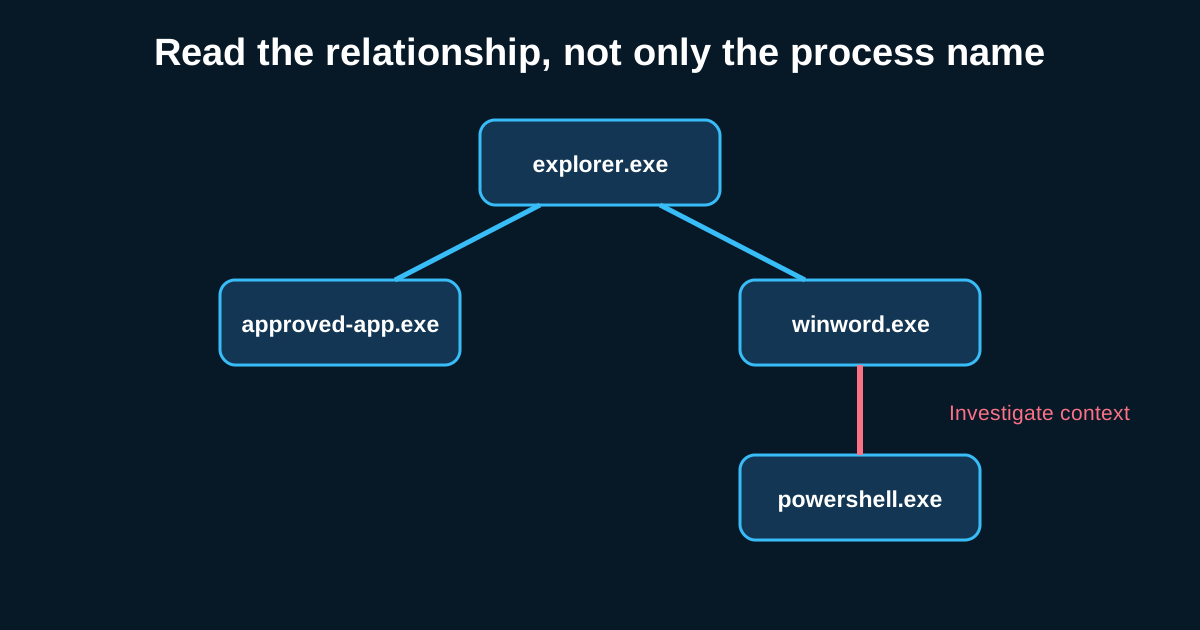
winword.exe spawning cmd.exe spawning powershell.exe with a base64-encoded argument isn’t a coincidence you write off—it’s close to a textbook phishing-to-execution chain, and if you can’t read that relationship at a glance, you’re going to miss it buried in a sea of legitimate process activity. Process tree analysis is one of those skills that separates hunters who catch things from hunters who scroll past them.
The core idea is simple: every process on Windows has a parent, and that lineage tells you how something got started. The complication is that legitimate software creates weird-looking trees constantly, so the skill isn’t memorizing “bad” parent-child pairs—it’s understanding what’s normal for your environment well enough that the abnormal actually stands out.
Know Your Legitimate Baseline Before You Hunt For Anomalies
Before you can spot a suspicious process tree, you need to know what a boring one looks like in your specific environment. services.exe spawning svchost.exe instances is normal—that’s just how Windows services work. explorer.exe spawning most user-launched applications is normal. A background update service spawning a temporary installer process is normal.
What’s less obvious, and worth actually documenting for your environment: does your org use PowerShell heavily for legitimate admin tasks? If your IT team runs scheduled PowerShell scripts via Task Scheduler across your fleet nightly, taskeng.exe or svchost.exe spawning powershell.exe is baseline noise for you, not a hunt lead—but it would be a strong signal in an environment where PowerShell usage is rare. This is why generic “PowerShell spawned by X is bad” rules from a blog post (including this one) need calibration against your actual environment before you trust them.
Office Applications Spawning Shells Is Still One of the Best Signals Out There
Despite years of awareness campaigns, this pattern remains genuinely reliable: winword.exe, excel.exe, or outlook.exe as the parent of cmd.exe, powershell.exe, wscript.exe, or mshta.exe. Legitimate documents essentially never need to spawn a shell process. When this shows up, it’s almost always either a macro-enabled document that got a user to click “Enable Content,” or an exploit against the Office application itself.
A concrete example: outlook.exe spawning mshta.exe with a command line pointing to an external HTA file—that’s a pattern I’d escalate immediately, no further context needed. The legitimate use case for Outlook spawning HTML application host processes is essentially zero. Compare that to something like winword.exe spawning splwow64.exe, which is completely mundane (that’s just print spooling for 32-bit compatibility)—the point being, you need to actually know which child processes are expected versus alarming, not just pattern-match on “Office spawned something.”
Command Line Arguments Matter More Than the Process Name
A process tree showing powershell.exe alone tells you almost nothing. The same process with -EncodedCommand, -WindowStyle Hidden, -ExecutionPolicy Bypass, and a long base64 string in the arguments tells you a lot. Attackers gravitate toward these flags because they suppress visible output and evade naive detection that only looks at the process name.
Build your investigation habit around always pulling full command-line arguments, not just the process name, when reviewing a tree. I’ve seen analysts flag rundll32.exe as suspicious purely because it’s a commonly abused LOLBin, without ever checking what it was actually being told to run—which misses both the false positives (legitimate rundll32 calls are extremely common) and the actual malicious ones that a quick argument check would’ve confirmed in seconds.
Depth and Breadth of the Tree Tell Their Own Story
A process tree that’s unusually deep—five or six generations of child processes stacking up in rapid succession—is itself a signal worth noticing, independent of what any individual process is named. Legitimate software rarely chains through that many process hops in a tight timeframe. Attackers building multi-stage droppers or living-off-the-land chains (spawn a shell, which downloads a script, which spawns another interpreter, which injects into a fourth process) create exactly this kind of deep, rapid tree.
Timing matters too. A tree where five child processes spawn within two seconds of each other reads very differently than the same five processes spawning over the course of a normal workday. EDR tools that show process creation timestamps alongside the tree structure make this pattern immediately visible—a burst of process creation activity in a tight window is a decent hunt trigger on its own, separate from any single suspicious process name.
Orphaned and Reparented Processes Deserve Extra Scrutiny
Occasionally you’ll see a process whose recorded parent doesn’t match what you’d expect—the parent process ID points to something that terminated moments earlier, or the parent-child relationship looks structurally odd for how that software normally behaves. This can indicate process injection or parent PID spoofing techniques, where an attacker deliberately manipulates the reported lineage to make malicious activity look like it originated from a trusted process.
This is genuinely hard to catch reliably without decent EDR telemetry, because Windows’ own event logging doesn’t always capture this cleanly. If your EDR platform reports both the claimed parent and verifies it against actual process handle relationships, cross-check the two when something in a tree looks off but the individual processes all seem benign on their own—the mismatch itself is the finding.
Process tree analysis rewards patience more than tooling. The best hunters I know can look at a tree and immediately narrate the story it’s telling—not because they’ve memorized every bad pattern, but because they’ve spent enough hours in their own environment’s normal traffic that abnormal actually jumps out.