Network Hunting with Zeek
Learn how threat hunters use Zeek logs conn, dns, http, ssl to build hunt hypotheses and catch attackers PCAP alone would miss.
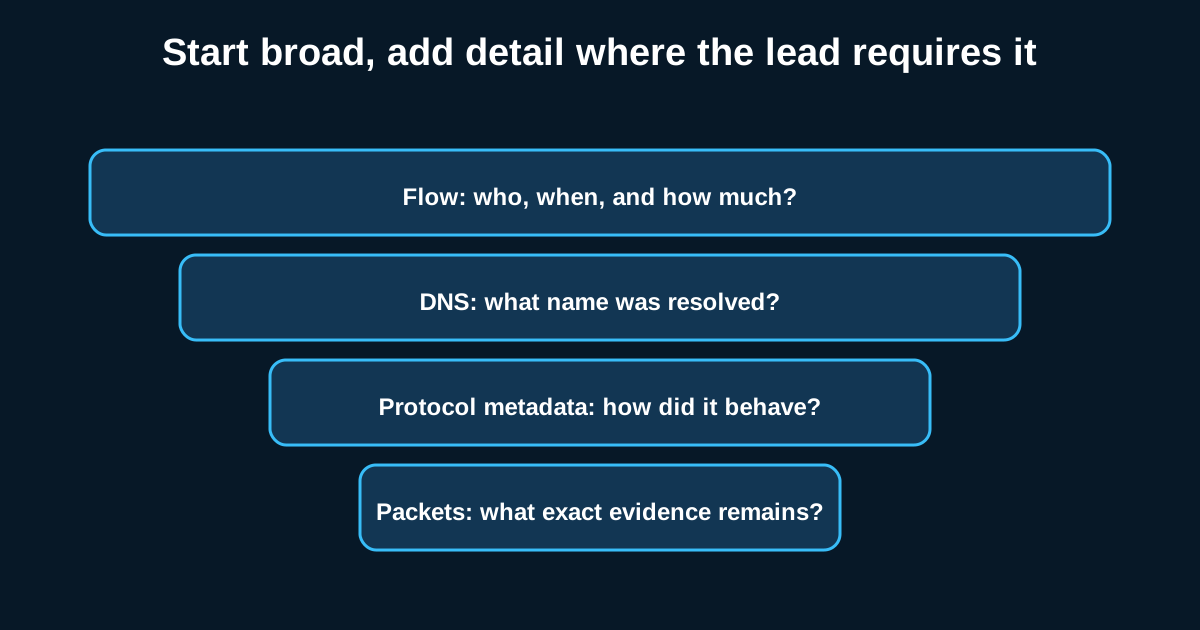
A ransomware affiliate doesn’t announce itself with a pop-up. It shows up first as a weird DNS query at 3 a.m., a JA3 hash that doesn’t match anything in your environment, or a connection that stays open for six hours doing almost nothing. If you’re only looking at full packet captures for this kind of thing, you’re going to drown. Zeek exists precisely so you don’t have to.
I’ve run Zeek (formerly Bro) in production SOCs where the raw PCAP volume was measured in terabytes per day, and the honest truth is nobody reads that much traffic by hand. What Zeek gives you instead is structured, queryable metadata—conn.log, dns.log, http.log, ssl.log, and a dozen others—that turn a firehose of packets into something you can actually pivot through during an investigation.
Why conn.log Is Your First Stop, Not http.log
Most people jump straight to http.log because HTTP feels familiar. Don’t. Start with conn.log. It’s the connection ledger for everything on your wire, and it’s where long-duration, low-volume, or oddly-shaped sessions stand out.
Say you’re hunting for C2 beaconing. You’d query conn.log for sessions with a short duration but a high connection count to the same destination IP over 24 hours—a classic beacon signature. A real example I’ve seen: a host beaconing to a VPS every 58-62 seconds, with a payload size that varied by only a few bytes each time. That jitter pattern (roughly consistent interval, tiny size variance) is far more telling in conn.log than anything you’d catch eyeballing a PCAP.
The duration field matters too. Legitimate business traffic to SaaS platforms tends to be bursty—connect, transfer, disconnect. A connection sitting open for hours with minimal bytes exchanged is either a misconfigured monitoring tool or something worth a second look.
DNS Log Is Where Attackers Get Lazy
dns.log is underrated. Attackers rotate IPs constantly but domain infrastructure changes less often, and DNS tunneling still shows up more than people expect, especially in environments without strict egress filtering.
Look for query entropy—domains with high randomness in the subdomain portion (think a8f3k2j9x.baddomain.io) are a strong DGA or tunneling indicator. Also watch TXT record queries; legitimate business use of TXT lookups is fairly narrow (SPF checks, some SaaS verification), so a spike in TXT queries from an endpoint that normally only does A/AAAA lookups deserves attention.
One pattern worth building a hunt around: NXDOMAIN response ratio per host. A workstation generating dozens of NXDOMAIN responses per hour, especially against domains with short TTLs, is a decent DGA candidate—malware families like this often burn through domain lists until one resolves.
SSL/TLS Metadata Without Decryption
You don’t need to break TLS to get value from it. Zeek’s ssl.log captures JA3/JA3S fingerprints, certificate details, and SNI—enough to fingerprint client behavior even when the payload is opaque.
JA3 hashes are particularly good for catching malware families that use custom or embedded TLS stacks rather than the OS/browser library. A JA3 hash that doesn’t match Chrome, Firefox, or your standard managed browsers, coming from a workstation that should only be running those, is a solid hunt lead. Pair that with self-signed or newly-issued certificates (check cert validity start date—anything issued in the last 48 hours talking to a workstation is suspicious) and you’ve got a decent starting hypothesis without ever touching decrypted content.
Building Actual Hunt Hypotheses, Not Just Dashboards
Here’s where a lot of teams go wrong: they stand up Zeek, ship logs to their SIEM, build some dashboards, and call it threat hunting. It isn’t. Dashboards show you what’s already flagged as anomalous by someone else’s math. A hunt starts with a hypothesis—”if an adversary is using DNS tunneling for exfil, I’d expect to see X”—and then you go test it against the logs.
A hypothesis I like running quarterly: “if a host is compromised with a modern C2 framework using JA3 randomization, beacon interval alone becomes my best signal.” Then I build the conn.log query around interval consistency rather than fingerprinting, because I’ve already assumed the fingerprint is being evaded.
This is analysis work, not detection engineering—you’re not writing a rule that fires forever, you’re testing a theory against a specific dataset and specific timeframe, then documenting what you found (or didn’t) so the next hunter doesn’t repeat the same dead end.
Zeek Isn’t a Replacement for Full PCAP—It’s a Filter
The honest limitation here: Zeek gives you metadata, not content. Once you find something interesting via conn.log or dns.log, you’ll still want the actual packets for deep-dive investigation—payload inspection, protocol anomalies, exact byte sequences. Zeek’s job is narrowing millions of sessions down to the dozen worth pulling PCAP for. Treat it as a triage layer, not the whole workflow.
If you’re running Zeek without a documented hunt cadence—no set hypotheses, no review of what queries you’ve already run—you’re basically operating a very expensive log aggregator. The tool is only as good as the hunter asking it questions.