YARA Rules for Threat Hunters
YARA rules let hunters detect malware families and attacker tooling by pattern, not just hash. Here's how to write ones that actually hold up.
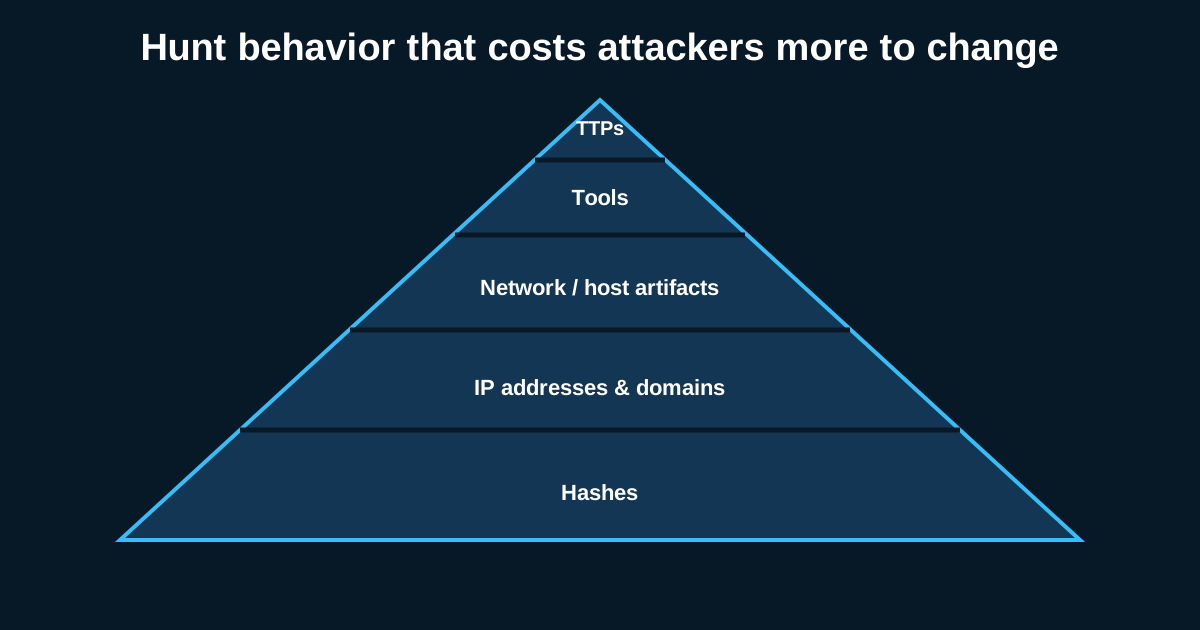
A hash match tells you that you’re looking at exactly one file. Change a single byte and it’s gone. That’s the whole problem with hash-based detection, and it’s why YARA still matters as much as it does a decade-plus into its life—it lets you describe what a malware family looks like structurally, not just what one specific sample happens to hash to.
I’ve watched teams treat YARA as something you write once during incident response and then forget about. That’s a waste of the tool. Good YARA rules, built and maintained properly, become a durable hunting asset—something you run against new samples, EDR-collected memory dumps, or file shares on an ongoing basis, not just a one-off IOC from last quarter’s incident.
Strings Are Easy—Good Strings Are Not
Anyone can write a YARA rule with a strings section pulling literal text out of a sample. The skill is in choosing strings that are actually distinctive to the malware family rather than incidentally present because of the compiler, the packer, or a shared library.
Say you’re analyzing a loader and you find the string “This program cannot be run in DOS mode”—that’s in basically every PE file ever compiled, useless as a detection string. What you want are things unique to the actual malicious logic: a specific mutex name the malware creates (something like Global\\a3f8e91c2b, especially if it follows a recognizable generation pattern across samples), a hardcoded C2 beacon format string, or an unusual PDB path left in by a careless build process.
Hex patterns for known byte sequences in a packer’s unpacking stub, or specific opcodes patterns in a custom encryption routine, tend to be more durable than ASCII strings because attackers change their C2 domains and mutex names between campaigns far more often than they rewrite their crypto routine from scratch.
Condition Logic: Don’t Just OR Everything Together
A common beginner mistake is writing five strings and connecting them with any of them—meaning a single incidental string match fires the whole rule. That’s how you end up with a rule that “catches” a malware family but actually just fires on any PE file containing one common substring, generating false positives across your entire file share.
Better structure: combine specific, distinctive strings with all of logic where the strings genuinely co-occur in every real sample of the family, and reserve any of for genuinely interchangeable indicators—like several known C2 domain string variants where any single one confirms the family. Layer in file characteristics too: filesize < 500KB combined with uint16(0) == 0x5A4D (checking for a valid PE header) filters out a lot of noise before string matching even happens, which also helps performance when you’re scanning large file sets.
Test Against Clean Sample Sets, Not Just the Malware
This is the step most people skip, and it’s the one that actually determines whether a rule is usable in production. Before you trust a YARA rule, run it against a clean baseline—a folder of legitimate software, system binaries, whatever represents normal traffic through your environment (say a sample of 2,000-3,000 clean executables pulled from a typical Windows install plus common enterprise software). If it fires on anything in that clean set, your strings or condition logic aren’t distinctive enough yet.
I keep a standing clean-sample corpus specifically for this—it grows a little every time I add software the org actually uses, and every new rule gets run against it before it goes anywhere near production scanning. It’s caught embarrassing false positives more than once, including a rule that was inadvertently matching on a string present in a common installer framework used by half the software in the building.
Hunting With YARA Beyond the Obvious Filesystem Scan
Most people think “YARA scan” means pointing it at files on disk, and that’s a fine baseline use, but it undersells the tool. YARA works against memory dumps too—scanning process memory for injected code, unpacked payloads that never touch disk, or strings that only exist post-decryption at runtime. A lot of modern malware never writes a clean file to disk at all; it lives entirely in memory after an initial loader stage, which makes memory scanning genuinely necessary rather than optional for a lot of current tradecraft.
Combine this with EDR platforms that support YARA scanning natively (several major EDR products let you push custom YARA rules for retroactive or live scanning across the fleet) and you get something closer to actual hunting at scale—running a rule for a newly identified malware family against every endpoint’s memory and file system, retroactively, rather than waiting for a signature-based detection to catch the next instance.
Keep Rules Attributed and Versioned
Small habit, big payoff: put a comment block at the top of every rule with the author, date, the malware family or campaign it targets, and a reference to the sample or incident it came from. Six months later when a rule fires, whoever’s triaging that alert needs to know immediately what it’s detecting and why, without having to reverse-engineer your own logic back into English. YARA rules without context are almost as bad as no rule at all—they generate alerts nobody can act on quickly.
YARA rewards the analysts willing to actually study a malware family’s structure instead of grabbing the first suspicious-looking string. That extra hour of analysis up front is usually the difference between a rule that catches the next three variants in a campaign and one that stops working the moment the attacker recompiles.