Sysmon Deep Dive: Process, Network, File Events
Master Sysmon Event IDs 1, 3, and 11 the three event types that carry the most weight in endpoint threat hunting.
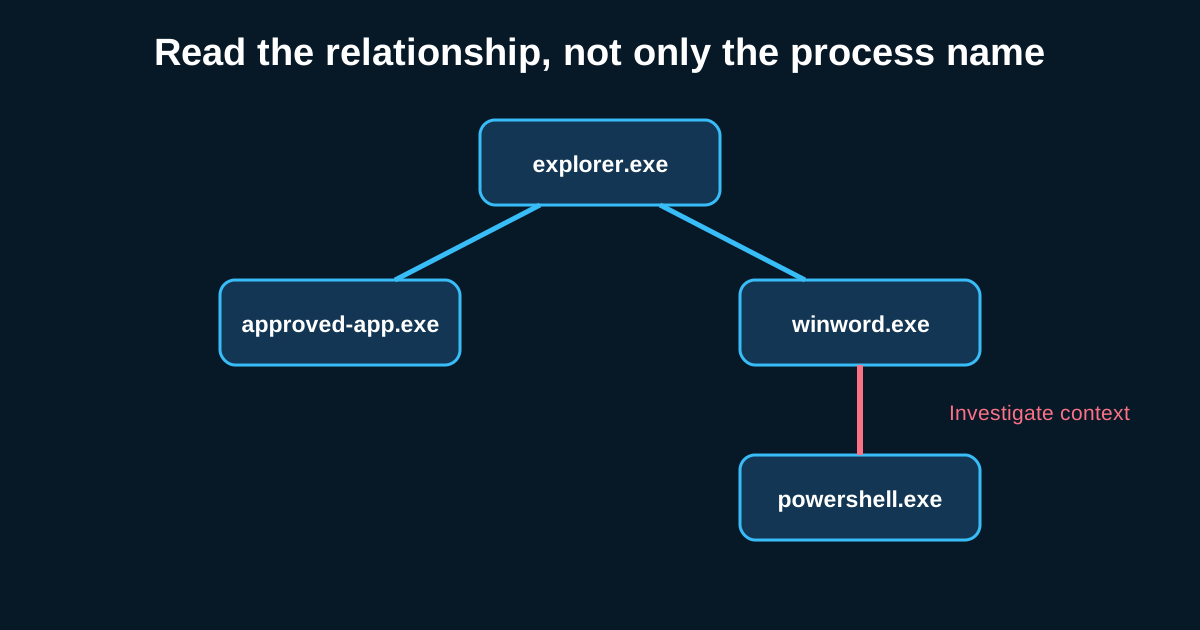
If you only had three Sysmon event types to hunt with, you’d pick process creation, network connection, and file creation, and you’d still catch most of what matters. These three cover execution, communication, and persistence-or-staging behavior—the core of almost every intrusion narrative. Everything else in Sysmon’s event catalog is valuable, but these three carry the weight.
I want to walk through what each one actually gives you, because “log process creation” sounds simple until you’re staring at the raw event and deciding what to actually query on.
Event ID 1: process creation is really about the command line, not the process name
The process name field is close to useless on its own—attackers rename binaries constantly, and svchost.exe or powershell.exe showing up tells you nothing by itself. The command line is where the actual signal lives. A process creation event showing powershell.exe -enc
Hunt hypotheses built around Event ID 1 should almost always chain command-line patterns with parent-child relationships. Say you’re looking for suspicious Office-to-shell execution: winword.exe spawning cmd.exe or powershell.exe as a direct child is a pattern that has essentially zero legitimate business use in most environments, yet it’s exactly what a malicious macro payload produces. That single parent-child pairing, filtered against your environment (maybe 15,000 process creation events a day down to a handful matching that specific chain), is one of the highest-value hunts you can build from this event type alone.
Don’t sleep on the hash fields either. SHA256 hash matching against a known-bad list is table stakes, but the more interesting investigation move is hash reuse tracking—the same binary hash showing up under different file names across multiple hosts is a strong lateral movement or staged-tooling signal, regardless of whether that hash matches any known malware family.
Event ID 3: network connections need process context to mean anything
A raw network connection event—source IP, destination IP, port, protocol—is basically NetFlow with extra steps unless you tie it back to the initiating process. Sysmon gives you that for free, which is the entire reason this event type matters more than equivalent network-only telemetry.
The analysis that actually pays off here: baseline which processes on a given host type normally make outbound connections, then flag violations of that baseline. A SQL Server process making outbound HTTPS connections to an external IP is worth investigating on its own merits—database engines have no ordinary reason to reach out to the internet. Compare that to a browser process doing the same thing, which is just Tuesday.
One pattern worth specifically building a query for: process making a connection to an internal IP on an unusual port, immediately followed by a second connection from that same process to an external IP. That two-hop pattern shows up in staged C2 relay setups and in some lateral-movement-then-callback sequences, and it’s nearly invisible if you’re only looking at connections one at a time instead of sequencing them per process.
Event ID 11: file creation is your best window into staging and drop activity
File creation events tell you where new files are landing on disk, which makes this the event type to lean on for catching payload drops, staging archives, and persistence artifacts before they’ve had a chance to execute or matter. The field that gets underused here is the target filename path combined with the creating process—a legitimate installer creating files in Program Files looks nothing like a browser process writing an executable into a Temp folder.
Say you build a filter for any .exe, .dll, or .ps1 file created by a browser process (chrome.exe, firefox.exe, msedge.exe) outside the expected Downloads directory. In a typical environment that might flag five or six events a week, almost all legitimate—software installers downloaded and run directly. But the rare event where that pattern shows a randomly-named DLL landing in an AppData subfolder immediately followed by a rundll32.exe execution referencing that exact file is a genuinely strong lead, and one that Event ID 11 alone gave you visibility into.
Stitching all three together into one investigation
The real value isn’t any single event type—it’s correlating them into a timeline. File creation drops a payload, process creation executes it, network connection shows it calling out. When you can pull all three for a single host within a tight time window and lay them out chronologically, you’re not looking at three separate alerts anymore—you’re looking at an attack narrative, and that narrative is what actually gets written up in an incident report or handed to a hunt lead for deeper investigation.