Build a Threat Hunting Home Lab: A Safe, Practical Guide
Build an isolated threat-hunting lab that produces useful Windows, identity, and network telemetry for safe practice.
Threat hunting becomes real when you can ask a question, query telemetry, and follow the evidence yourself. A home lab gives you that practice without requiring a production SOC.
The goal is not to recreate an enterprise. Build the smallest environment that lets you generate normal activity, simulate one approved technique, collect the evidence centrally, and investigate it.
Safety first: keep the lab isolated from work, school, and household networks. Use only authorized simulations on systems you own. Do not expose intentionally vulnerable machines or management interfaces directly to the internet.
What you will build
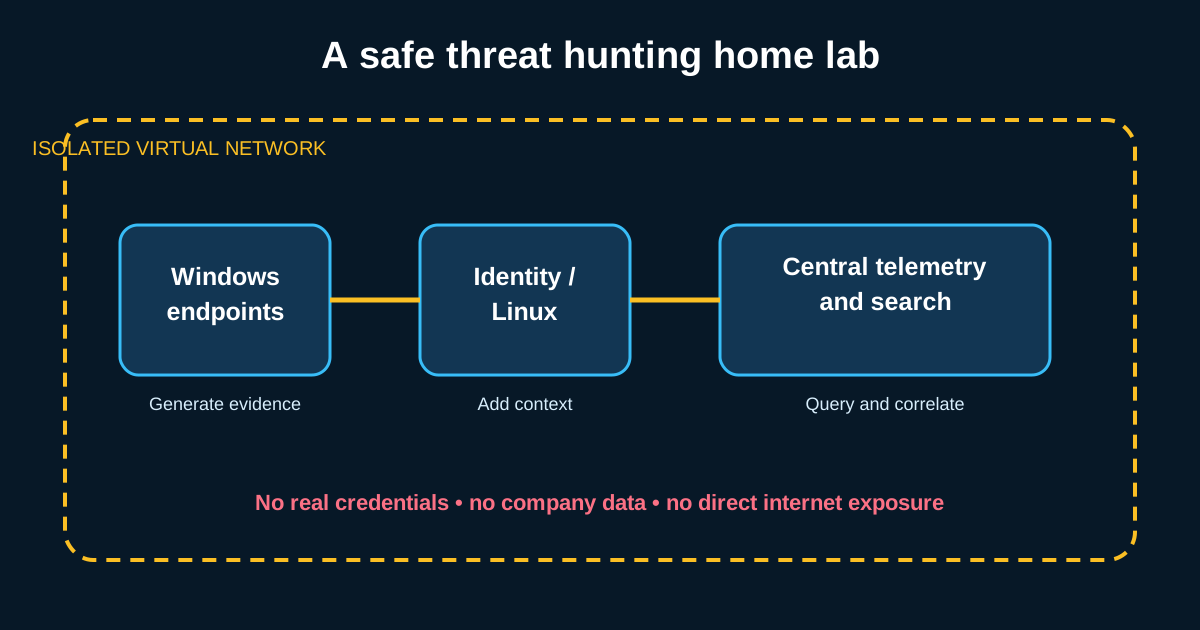
A useful starter lab has four layers:
- Virtualization: a host running local virtual machines.
- Targets: one or two Windows endpoints and, optionally, a domain controller or Linux host.
- Telemetry: endpoint, authentication, PowerShell, and network records.
- Analysis: a central search platform where events can be correlated across systems.
Hardware and scope
With 16 GB of RAM, begin with two small VMs and run only what the exercise needs. With 32 GB or more, a domain controller, two endpoints, a Linux system, and a modest analysis stack are more comfortable.
Snapshots matter more than scale. Create a clean snapshot after the operating system, updates, telemetry, and log forwarding work. Restore it after exercises instead of allowing unknown changes to accumulate.
Cloud-hosted labs can work, but require careful cost controls, firewall rules, identity protection, and teardown procedures. Local virtualization is usually simpler for a first lab.
Design the network safely
Use an isolated virtual network for lab traffic. If a VM needs updates, provide temporary outbound access, patch it, and return it to the isolated segment. Avoid bridged networking for intentionally vulnerable targets.
Create two kinds of accounts:
- a normal user for everyday baseline activity; and
- a separate administrator for configuration.
Do not reuse real passwords, API keys, browser profiles, or company data. Treat every credential inside the lab as disposable.
Build telemetry before simulations
The common failure is to run a technique first and discover afterward that nothing useful was recorded. Validate the data pipeline before generating suspicious activity.
For a Windows-focused starter lab, collect:
- process creation, including command line and parent process;
- authentication successes and failures;
- PowerShell script block and module logging;
- network connections or equivalent flow data;
- scheduled task and service creation; and
- DNS activity, where available.
Sysmon can enrich Windows visibility, but its configuration determines what it records. More events are not automatically better: excessive collection can hide the useful signal and exhaust a small lab. Start with a maintained baseline configuration, understand each enabled event type, then tune for your exercises.
Validate each link in the pipeline
Before the first hunt, confirm:
- every expected host sends data;
- hostnames, users, process IDs, and timestamps are populated;
- clocks are synchronized;
- the analysis platform uses a consistent time zone;
- events arrive within an acceptable delay; and
- you can search one known action end to end.
Create a harmless test process on an endpoint and verify that its executable, command line, parent, user, host, and timestamp appear centrally. If any field is missing, fix collection before adding complexity.
Generate safe, repeatable activity
Use a reputable adversary-emulation framework only inside the isolated lab, and run individual tests you have reviewed. Record the technique, expected change, cleanup steps, and start time. Avoid payloads that disable protections, destroy data, steal real credentials, or create internet-facing access.
For a first exercise, scheduled-task creation is easy to understand and observe:
- Capture 15–30 minutes of ordinary activity.
- Create a benign scheduled task that launches a harmless local command.
- Note the exact execution window, but do not immediately inspect every generated event.
- Hunt for newly created tasks and their related process activity.
- Explain how you would separate your test from legitimate maintenance tasks.
- Remove the task and restore the clean snapshot if needed.
Write the hunt before the query
Use a small hunt record:
1
2
3
4
5
6
7
8
9
Hypothesis:
Scope and time range:
Required data:
Expected attacker evidence:
Likely benign explanations:
Queries and pivots:
Findings:
Data gaps:
Next action:
For the scheduled-task exercise, a hypothesis might be:
If persistence is created through a scheduled task, the endpoint will record task creation followed by execution from the task service, and the task name, author, path, user, timing, or child process may differ from the local baseline.
Add complexity gradually
Once one-host exercises are reliable, expand in this order:
- correlate task creation with process execution;
- compare the same behavior across two endpoints;
- add authentication and a second identity;
- follow activity from one host to another; and
- build a short timeline across endpoint, identity, and network data.
Change one variable at a time. If you add a domain controller, network sensor, three tools, and five simulations together, pipeline failures become difficult to diagnose.
A lab-readiness checklist
- The virtual network is isolated.
- No personal or organizational credentials are present.
- Clean snapshots exist.
- Endpoint and authentication telemetry arrive centrally.
- Timestamps and host identities are consistent.
- One harmless action can be traced end to end.
- Each simulation is reviewed, scoped, and cleaned up.
- Every hunt is recorded, including negative results and data gaps.
A good hunting lab is a telemetry laboratory, not a collection of attack tools. Build the evidence pipeline first, validate it with harmless actions, and add one controlled technique at a time. The discipline you develop—hypothesis, evidence, validation, and documentation—is the same discipline you will use in a real SOC.