Malware Analysis for Threat Hunters
Hunters don't need to reverse full malware families they need hunt-relevant intel fast. Here's the static and dynamic workflow that gets it.
A malware analyst and a threat hunter want different things from the same sample. The analyst wants to fully understand it every function, every anti-analysis trick, the whole family tree. The hunter wants three things: what does it touch, what does it talk to, and what would that look like in my logs. Confusing those two goals is why a lot of hunting teams either skip malware analysis entirely or spend four hours in a debugger when twenty minutes would’ve gotten them what they actually needed.
That’s the frame worth holding onto through this whole workflow. You’re not trying to become a reverse engineer. You’re trying to turn a binary into detection logic fast enough that it’s still useful.
Static analysis first, and don’t skip the boring parts
Before anything touches a sandbox, run the sample through basic static triage strings, imports, section entropy, and a hash lookup against whatever threat intel sources you’ve got. This sounds obvious enough that people skip it, which is a mistake, because a shocking number of samples give up meaningful information here without any dynamic execution at all.
Import table analysis is underrated. A binary importing CreateRemoteThread, VirtualAllocEx, and WriteProcessMemory together is telegraphing process injection before you’ve run a single instruction. Combine that with high entropy in one specific section say 7.8 out of 8 in a section that’s otherwise small, which usually means packed or encrypted code and you’ve got a strong hypothesis about behavior before dynamic analysis even starts. String extraction, especially with a decent regex pass for URLs, IPs, and registry paths, sometimes hands you C2 infrastructure directly if the sample wasn’t packed carefully. I’ve seen plain-text C2 domains sitting in unpacked strings more times than I’d expect from anything calling itself sophisticated malware.
Dynamic analysis is where hunt-relevant artifacts actually show up
Detonate in an isolated sandbox your own, or a service like Any.Run or a local Cuckoo instance if you need network isolation guarantees and watch specifically for what a hunter needs, not what a malware researcher needs. That distinction matters. You’re not documenting every API call sequence. You’re capturing file system changes, registry modifications, process spawns, and network behavior in a form you can turn into a detection within the hour.
Concretely: does it drop a file, and where? A sample dropping a copy of itself into %APPDATA%\Roaming\ under a name mimicking a legitimate application chrome_update.exe sitting next to the real Chrome installer path, say gives you a file path and naming pattern you can hunt for across the fleet immediately, even before you understand the malware’s full capability. Does it create a scheduled task or a registry Run key for persistence? That’s a detection you can write in the next ten minutes, independent of anything else the sample does.
Network behavior is usually the highest-value output for hunters specifically
Malware analysis for hunting purposes should almost always prioritize network indicators over host-based ones, because network indicators travel the same C2 infrastructure often serves multiple campaigns, sometimes for months, and finding it once means you can hunt for it retroactively across historical DNS and proxy logs going back as far as your retention allows.
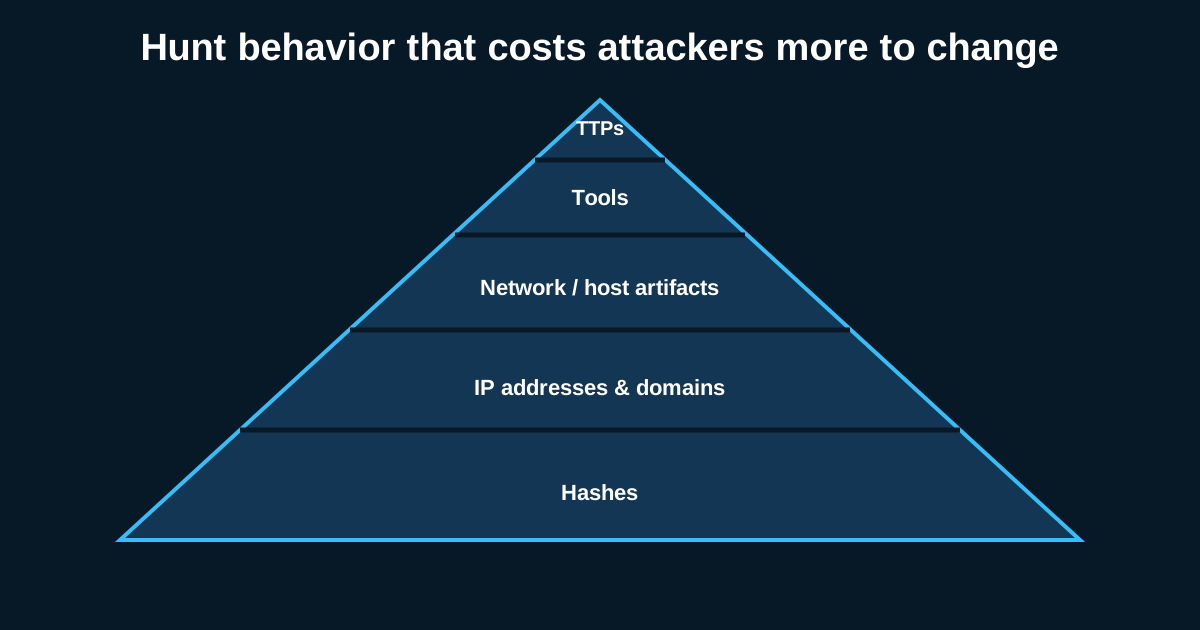
Watch the beacon pattern specifically, not just the destination. A lot of malware families have a distinctive check-in interval every 60 seconds, every 300 seconds, with small jitter added to avoid looking perfectly periodic. That interval, combined with a consistent request size or URI pattern, is often more durable as a detection than the IP address itself, since infrastructure rotates but the malware’s own behavior usually doesn’t change as often. If you can characterize “this family beacons roughly every five minutes with fifteen percent jitter to a URI matching this regex,” you’ve got something that survives infrastructure takedowns in a way a static IOC list never will.
Turning findings into detections before the sample goes stale
This is the step teams skip most often, and it’s the one that actually justifies the time spent analyzing anything. Every artifact from static and dynamic analysis should map to a specific detection a Sigma rule for the registry Run key, a Suricata signature for the beacon pattern, a YARA rule for the packed section characteristics if you want to catch variants before they even execute.
Prioritize behavioral detections over pure IOC matching wherever you can. An IOC list of hashes and IPs has a shelf life measured in days for anything remotely active. A detection built around “process injection into a browser process followed by an outbound beacon at a consistent interval” survives the next sample recompile, the next infrastructure rotation, sometimes the next several campaign iterations from the same actor.
Knowing when to stop
Not every sample deserves the full workflow. A commodity loader you’ve seen fifty times this month doesn’t need fresh dynamic analysis check it against what you already know and move on. Save the deep-dive time for anything that doesn’t match existing intelligence, shows genuinely novel behavior, or is tied to an active incident where understanding capability fully actually changes your response. Analysis for its own sake is a time sink; analysis that feeds directly into detection and investigation is the whole point.