Mapping the SOC Data Ecosystem
A practical map of every data source available to a threat hunter, what each one actually reveals, and where the blind spots hide.
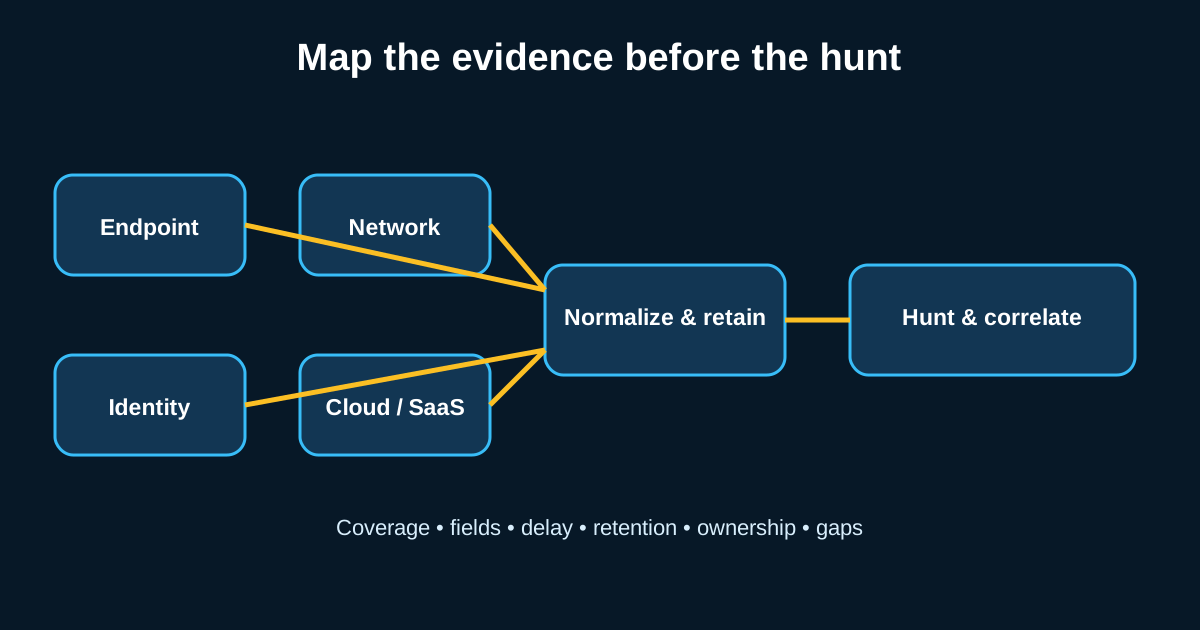
Ask a hunter what their biggest constraint is and most won’t say skill or time. They’ll say data—specifically, not knowing what’s actually available versus what’s theoretically available. There’s a real difference between “we have EDR” and “we have EDR configured to log the specific event types this hypothesis needs,” and that gap kills more hunts than bad hypotheses do.
Building a mental map of your SOC’s data ecosystem before you need it—not scrambling to figure it out mid-hunt—is one of the more boring but genuinely load-bearing habits a hunter can develop.
Endpoint Telemetry: Where Most Hunts Actually Live
Endpoint data tends to carry the most weight in day-to-day hunting because it’s closest to where execution happens. Sysmon logs, if configured well, give you process creation, network connections, file creation events, registry modifications, and named pipe activity—Event ID 1 through 25ish depending on your config. EDR platforms layer on top of this with behavioral context the raw Windows event log doesn’t give you natively, things like process injection detection or credential access attempts flagged by the agent itself.
The catch is configuration depth. Say your org runs Sysmon but the config file only logs process creation and network connections, skipping registry and file events entirely—you’ll hit a wall the moment a hypothesis needs registry-based persistence evidence, and that wall won’t announce itself. The query just returns nothing, and it’s easy to misread “nothing collected” as “nothing happened.”
Identity and Authentication Data: The Underrated Goldmine
Windows authentication logs (Event ID 4624, 4625, 4768, 4769 for Kerberos) and whatever your IdP produces—Azure AD sign-in logs, Okta system logs—are where a huge amount of lateral movement and privilege escalation evidence actually surfaces. An attacker moving through your environment has to authenticate somewhere, eventually, and that leaves a trail even when process-level telemetry is thin.
This category gets underused because authentication logs are noisy and unglamorous compared to EDR alerts. A domain with 2,000 users can easily generate 100,000+ authentication events a day. But that noise is exactly why it’s valuable for hunting rather than automated detection—patterns that don’t fit a rigid rule (an account authenticating to a system it’s never touched, at an hour it’s never used before) show up clearly once you’re willing to pivot through the volume manually.
Network Data: Declining in Value, Still Not Useless
Network-based telemetry—NetFlow, full packet capture, DNS logs, proxy logs—used to be the primary hunting data source before endpoint tooling matured. It’s lost ground because so much traffic is now encrypted and attackers have gotten better at blending into normal traffic patterns. But it’s far from dead. DNS logs in particular remain one of the higher-value, lower-cost data sources you can collect, because command-and-control infrastructure almost always needs domain resolution at some point, and DNS logging overhead is minimal compared to full packet capture.
Proxy logs earn their keep for a similar reason—outbound connections to newly registered domains, or connections using unusual user-agent strings, are cheap signals to pull and surprisingly effective. A hunter working from a hypothesis about C2 beaconing will usually check DNS and proxy logs before touching packet capture, just because the signal-to-noise ratio is better and the query runs faster.
Cloud and SaaS Logs: The Newest, Most Uneven Category
Cloud provider logs—AWS CloudTrail, Azure Activity Logs, GCP Audit Logs—plus SaaS application logs (Microsoft 365, Google Workspace, Salesforce) round out the modern data ecosystem, and this is where maturity varies wildly between organizations. Some shops have CloudTrail feeding into their SIEM with full API call visibility. Others have it enabled but sitting in an S3 bucket nobody’s ingesting anywhere useful, which for hunting purposes is functionally the same as not having it at all.
This category deserves specific attention because attacker techniques here don’t map cleanly onto traditional endpoint-based ATT&CK thinking. A hunt for anomalous IAM policy changes or unusual OAuth app grants in Microsoft 365 needs a genuinely different mental model than a hunt for suspicious process execution on a Windows box, even though both are “threat hunting” in the broad sense.
Building Your Own Inventory Before You Need It
The practical move here isn’t reading about data sources in the abstract—it’s building an actual inventory specific to your environment. For every log source, note what’s collected, at what retention period, and critically, what’s NOT collected that you’d assume is (this is the part people skip). A one-page table mapping data source to retention to known gaps saves enormous time mid-hunt, because you stop discovering gaps in the middle of an investigation and start knowing them going in.
Retention period matters more than people initially credit it. If your SIEM only holds 30 days of endpoint logs and a hunt hypothesis involves activity from two months ago based on a threat intel report, the data’s already gone regardless of how good your hypothesis is. Knowing that ahead of time changes which hunts are even worth attempting this quarter versus which ones need a retention policy change before they’re feasible at all.
Build your inventory
Create one row per data source with these fields: owner, covered assets, event types, searchable fields, collection delay, retention, access method, and known gaps. Then select one hypothesis and mark each required field as available, partial, or missing. This simple exercise prevents a missing telemetry field from masquerading as a clean result.
A hunter does not merely know that a log source exists. They know what it records, what it omits, how long it survives, and whether it can answer the question being asked.