What Is Threat Hunting? A Practical Introduction
Learn what threat hunting is, how it differs from alert monitoring, and how to run a small hypothesis-driven hunt.
Your alert queue is empty. The dashboards are green. That is good news—but it is not proof that the environment is clean.
An attacker may be using a legitimate administrator tool, a valid account, or a scheduled task that resembles normal operations. None of those actions must trigger an alert on its own. Threat hunting exists for this gap: the space between what your controls already recognize and what an intruder may be doing quietly.
The question this lesson answers
By the end of this lesson, you should be able to:
- explain threat hunting in plain language;
- distinguish a hunt from monitoring and incident response;
- turn a security concern into a testable hypothesis; and
- describe what a useful hunt produces, even when it finds no attacker.
Threat hunting, in one sentence
Threat hunting is a proactive, evidence-led search for malicious activity that existing detections did not surface.
Three words in that definition matter:
- Proactive: the work does not begin with an alert.
- Evidence-led: a hunter tests an idea against telemetry rather than relying on intuition alone.
- Undetected: the search concentrates on blind spots, weak signals, and behavior that blends into normal activity.
Hunting is not scrolling through logs until something looks strange. A hunt begins with a question that can be tested.
Hypothesis: If an attacker is using a compromised service account for lateral movement, that account will authenticate to systems outside its normal peer group or operating schedule.
That statement tells us what data we need, what behavior to compare, and what would make a result interesting.
Monitoring and hunting solve different problems
Monitoring asks, “Did something match a condition we already defined?” Hunting asks, “What could be happening that our conditions do not yet cover?”
| Activity | Starting point | Typical outcome |
|---|---|---|
| Alert monitoring | A rule or product raises an alert | Triage and disposition |
| Threat hunting | A hypothesis, risk, or intelligence lead | Evidence, a closed gap, or an investigation |
| Incident response | A suspected or confirmed incident | Containment, eradication, and recovery |
Imagine that your organization records 40,000 authentication events each day. A detection may correctly flag five events that match known suspicious patterns. A hunter can examine the wider population and discover that one service account suddenly accessed six workstations it had never touched before. Each login may be valid in isolation; the sequence is unusual only when compared with the account’s history.
That is the kind of context hunting adds.
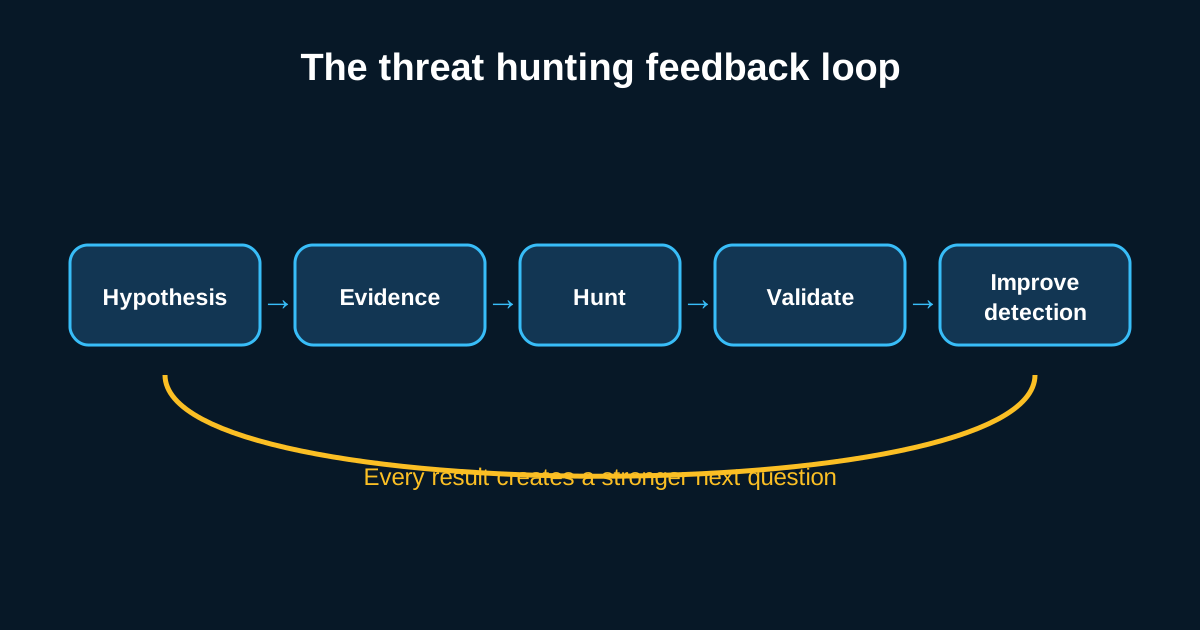
The hunting feedback loop
A useful hunt should leave the environment stronger than it found it. The usual flow is:
- Choose a question. Base it on risk, threat intelligence, a known visibility gap, or an observation from your environment.
- Define the evidence. Identify the logs and fields that could support or reject the hypothesis.
- Search and pivot. Query broadly, establish context, and follow related users, hosts, processes, and network connections.
- Challenge the result. Look for ordinary explanations before calling an event malicious.
- Act on the outcome. Escalate confirmed activity, improve telemetry, or convert repeatable logic into a detection.
If a hunt uncovers a new persistence pattern, the result should not live only in a report. Detection engineering can turn the repeatable parts into an alert. The next hunter can then spend time on a different unknown.
Three common ways to start a hunt
1. Hypothesis-driven
Start with a testable statement about attacker behavior in your environment. This approach works well for small teams because it can be tightly scoped.
Example: “If a threat actor is using PowerShell to download a payload, we will see unusual parent processes, encoded commands, or outbound connections from PowerShell.”
2. Intelligence-driven
Start with information about an actor, campaign, indicator, or technique and ask whether related evidence exists locally. Indicators can expire quickly, so do not stop at a hash or IP address; also extract the behavior behind it.
3. Anomaly-driven
Start with a deviation from an established baseline: a new parent-child process pair, a user reaching an unfamiliar system, or a host producing a sudden change in DNS volume. An anomaly is a lead, not a verdict. Normal business changes create anomalies too.
Mature teams mix all three approaches.
What an empty hunt tells you
Most hunts do not uncover an active compromise. That does not automatically make them failures. A well-run negative hunt can still show that:
- the required telemetry exists and is searchable;
- the hypothesis was tested over a documented scope and time range;
- a behavior is common enough to require better filtering; or
- a visibility gap prevents a confident conclusion.
Be precise with language. “No evidence found in the available data” is defensible. “The environment is clean” usually is not.
Your first 30-minute hunt
Try this low-risk exercise using authentication logs:
- Select one service account and a seven-day window.
- List the hosts it authenticated to, grouped by day.
- Mark first-seen destinations and activity outside its usual hours.
- Check whether a deployment, maintenance window, or ownership change explains them.
- Record the query, scope, result, and any missing data.
Do not begin by searching for “bad.” Begin by learning what is normal for that account, then investigate the exceptions.
Threat hunting is disciplined curiosity. You assume that preventive controls and detections can miss activity, form a question about how that activity would appear, and test it against the evidence you actually collect. The best hunts do more than find incidents: they improve your understanding of the environment and create better detections for everyone who comes after you.