Network Hunting Fundamentals
Core network hunting skills across NetFlow, packet capture, proxy logs, and firewall data what your traffic is actually telling you.
Endpoint telemetry lies sometimes. A rootkit can hide a process, tamper with logs, fake a checksum. Network traffic is a lot harder to fake convincingly, because packets have to actually traverse the wire to do anything useful for an attacker. That’s the underlying reason network hunting deserves equal footing with endpoint hunting, not a secondary role and it’s a gap a lot of hunting programs never quite close, usually because endpoint tooling is easier to deploy and network visibility requires more upfront architectural work.
The trouble is network data comes in several different flavors with very different strengths, and treating them as interchangeable is where a lot of hunting programs stall out early.
NetFlow gives you scale, not detail use it that way
NetFlow (or its vendor equivalents sFlow, IPFIX) records connection metadata: source, destination, ports, bytes transferred, duration. No payload. That limitation is also its superpower you can retain NetFlow data across an entire enterprise for months at a storage cost that full packet capture could never touch, which makes it the right tool for a completely different kind of question than deep packet inspection answers.
The hunt NetFlow is genuinely good at: connection pattern anomalies at scale. A single internal host establishing connections to two hundred distinct external IPs over a four-hour window, each connection lasting under a second, is a strong scanning or C2 fan-out indicator you’d catch instantly in flow data and would be painfully expensive to find any other way. Beaconing detection works well here too look for connections with unusually consistent duration and byte-count patterns recurring at regular intervals, which is exactly what a lot of malware C2 traffic looks like even when it’s encrypted, because the metadata shape survives encryption even when the content doesn’t.
Full packet capture is expensive, so spend it deliberately
Packet capture gives you everything every byte, every protocol detail, full payload if it’s unencrypted. It’s also storage-expensive enough that most organizations can’t run it everywhere, all the time, which means the real skill isn’t running PCAP, it’s deciding where and when to turn it on.
Rolling capture at network chokepoints internet egress, and the boundary between segments handling genuinely sensitive data covers the highest-value traffic without trying to boil the ocean. When an investigation genuinely needs payload-level detail (confirming whether a suspected C2 channel is actually exfiltrating data, or extracting a dropped file transferred over HTTP), that’s when PCAP earns its cost. Trying to run it everywhere as a first resort usually just produces a storage bill nobody wants to explain and data nobody has time to actually review.
Proxy logs catch what encryption is starting to hide
TLS everywhere means packet payload inspection increasingly hits a wall for anything HTTPS, which is most traffic now. Proxy logs assuming your environment forces traffic through one, and plenty still don’t for east-west traffic give you the URL, user agent, and often the SNI field even when the payload itself is encrypted end to end.
User agent analysis is underrated here. Malware families frequently use hardcoded, slightly-off user agent strings a version number that doesn’t match any real browser release, or a Python requests default string showing up on traffic that’s supposed to be a user’s browser session. Cross-referencing user agent against the process that actually generated the traffic, where your endpoint telemetry supports that correlation, closes a gap that network data alone can’t answer on its own. SNI field mismatches where the TLS handshake’s declared hostname doesn’t match what DNS resolution would suggest, or matches a domain flagged as recently registered are another proxy-log signal worth building a standing detection around.
Firewall logs are the unglamorous workhorse nobody wants to review
Firewall logs get treated as a compliance checkbox at a lot of organizations rather than an active hunting data source, which is a genuine miss. Denied outbound connection attempts, in particular, tell you something specific: an internal host tried to reach somewhere it wasn’t allowed to, which is either a misconfiguration or a compromised host testing its C2 channel against your egress rules before finding one that works.
A pattern worth watching for: a host generating denied connection attempts to several different ports or destinations in quick succession, followed shortly after by a successful connection somewhere else entirely. That’s consistent with malware probing for an open egress path trying 443, then 8443, then a nonstandard port until something gets through your firewall rules. Individually, denied connections get ignored constantly because there are so many of them. As a burst pattern immediately preceding a successful connection, they’re one of the better early-warning signals available in firewall data.
Correlating across sources instead of picking one favorite
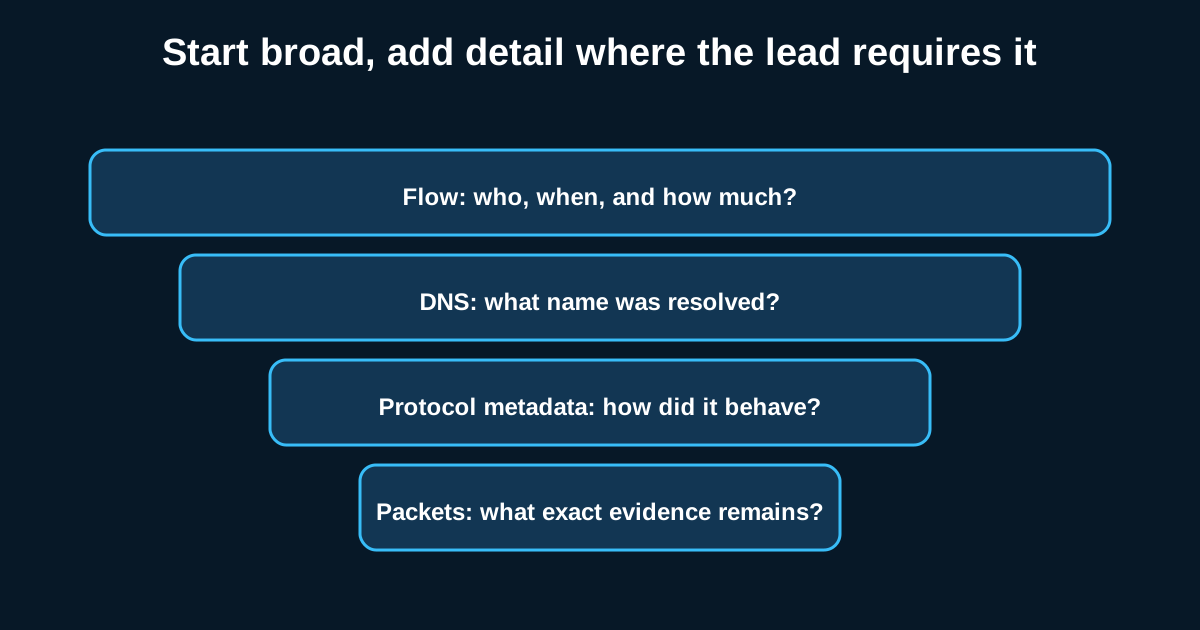
The real skill isn’t mastering any single network data source it’s knowing which one answers which question and pulling them together into one investigation when the situation calls for it. NetFlow tells you something’s unusual at scale. Proxy logs tell you what a specific session looked like. Firewall logs tell you what got blocked on the way. Full packet capture tells you exactly what happened, if you were already capturing when it did.
Building hunting workflows that move fluidly between these sources starting broad with flow data to find the anomaly, narrowing to proxy or firewall logs to characterize it, escalating to targeted packet capture only when detail genuinely matters is a more durable skill than becoming an expert in any single tool. Vendors change. The layered analysis approach doesn’t.